Calculate a rolling average of total revenue

Question
For each day in August 2012, calculate a rolling average of total revenue over the previous 15 days. Output should contain date and revenue columns, sorted by the date. Remember to account for the possibility of a day having zero revenue. This one's a bit tough, so don't be afraid to check out the hint!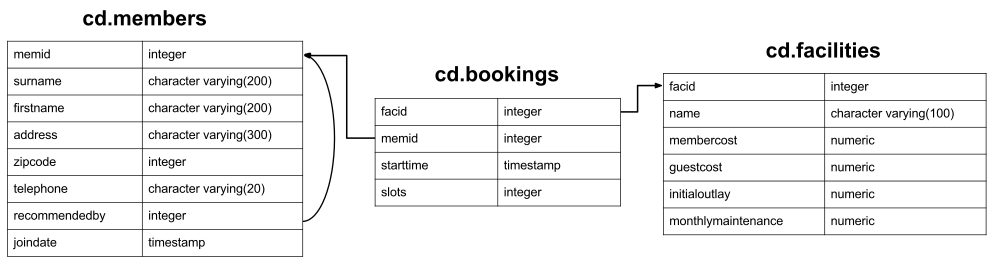
Expected Results
| date | revenue |
|---|---|
| Wed Aug 01 2012 00:00:00 GMT+0000 (Coordinated Universal Time) | 1126.8333333333333333 |
| Thu Aug 02 2012 00:00:00 GMT+0000 (Coordinated Universal Time) | 1153.0000000000000000 |
| Fri Aug 03 2012 00:00:00 GMT+0000 (Coordinated Universal Time) | 1162.9000000000000000 |
| Sat Aug 04 2012 00:00:00 GMT+0000 (Coordinated Universal Time) | 1177.3666666666666667 |
| Sun Aug 05 2012 00:00:00 GMT+0000 (Coordinated Universal Time) | 1160.9333333333333333 |
| Mon Aug 06 2012 00:00:00 GMT+0000 (Coordinated Universal Time) | 1185.4000000000000000 |
| Tue Aug 07 2012 00:00:00 GMT+0000 (Coordinated Universal Time) | 1182.8666666666666667 |
| Wed Aug 08 2012 00:00:00 GMT+0000 (Coordinated Universal Time) | 1172.6000000000000000 |
| Thu Aug 09 2012 00:00:00 GMT+0000 (Coordinated Universal Time) | 1152.4666666666666667 |
| Fri Aug 10 2012 00:00:00 GMT+0000 (Coordinated Universal Time) | 1175.0333333333333333 |
| Sat Aug 11 2012 00:00:00 GMT+0000 (Coordinated Universal Time) | 1176.6333333333333333 |
| Sun Aug 12 2012 00:00:00 GMT+0000 (Coordinated Universal Time) | 1195.6666666666666667 |
| Mon Aug 13 2012 00:00:00 GMT+0000 (Coordinated Universal Time) | 1218.0000000000000000 |
| Tue Aug 14 2012 00:00:00 GMT+0000 (Coordinated Universal Time) | 1247.4666666666666667 |
| Wed Aug 15 2012 00:00:00 GMT+0000 (Coordinated Universal Time) | 1274.1000000000000000 |
| Thu Aug 16 2012 00:00:00 GMT+0000 (Coordinated Universal Time) | 1281.2333333333333333 |
| Fri Aug 17 2012 00:00:00 GMT+0000 (Coordinated Universal Time) | 1324.4666666666666667 |
| Sat Aug 18 2012 00:00:00 GMT+0000 (Coordinated Universal Time) | 1373.7333333333333333 |
| Sun Aug 19 2012 00:00:00 GMT+0000 (Coordinated Universal Time) | 1406.0666666666666667 |
| Mon Aug 20 2012 00:00:00 GMT+0000 (Coordinated Universal Time) | 1427.0666666666666667 |
| Tue Aug 21 2012 00:00:00 GMT+0000 (Coordinated Universal Time) | 1450.3333333333333333 |
| Wed Aug 22 2012 00:00:00 GMT+0000 (Coordinated Universal Time) | 1539.7000000000000000 |
| Thu Aug 23 2012 00:00:00 GMT+0000 (Coordinated Universal Time) | 1567.3000000000000000 |
| Fri Aug 24 2012 00:00:00 GMT+0000 (Coordinated Universal Time) | 1592.3333333333333333 |
| Sat Aug 25 2012 00:00:00 GMT+0000 (Coordinated Universal Time) | 1615.0333333333333333 |
| Sun Aug 26 2012 00:00:00 GMT+0000 (Coordinated Universal Time) | 1631.2000000000000000 |
| Mon Aug 27 2012 00:00:00 GMT+0000 (Coordinated Universal Time) | 1659.4333333333333333 |
| Tue Aug 28 2012 00:00:00 GMT+0000 (Coordinated Universal Time) | 1687.0000000000000000 |
| Wed Aug 29 2012 00:00:00 GMT+0000 (Coordinated Universal Time) | 1684.6333333333333333 |
| Thu Aug 30 2012 00:00:00 GMT+0000 (Coordinated Universal Time) | 1657.9333333333333333 |
| Fri Aug 31 2012 00:00:00 GMT+0000 (Coordinated Universal Time) | 1703.4000000000000000 |
Your Answer
Your Results
Loading database...
Answers and Discussion
select 	dategen.date,
	(
		-- correlated subquery that, for each day fed into it,
		-- finds the average revenue for the last 15 days
		select sum(case
			when memid = 0 then slots * facs.guestcost
			else slots * membercost
		end) as rev

		from cd.bookings bks
		inner join cd.facilities facs
			on bks.facid = facs.facid
		where bks.starttime > dategen.date - interval '14 days'
			and bks.starttime < dategen.date + interval '1 day'
	)/15 as revenue
	from
	(
		-- generates a list of days in august
		select 	cast(generate_series(timestamp '2012-08-01',
			'2012-08-31','1 day') as date) as date
	)  as dategen
order by dategen.date;
There's at least two equally good solutions to this question. I've put the simplest to write as the answer, but there's also a more flexible solution that uses window functions.
Let's look at the selected answer first. When I read SQL queries, I tend to read the SELECT part of the statement last - the FROM and WHERE parts tend to be more interesting. So, what do we have in our FROM? A call to the GENERATE_SERIES function. This does pretty much what it says on the tin - generates a series of values. You can specify a start value, a stop value, and an increment. It works for integer types and dates - although, as you can see, we need to be explicit about what types are going into and out of the function. Try removing the casts, and seeing the result!
So, we've generated a timestamp for each day in August. Now, for each day, we need to generate our average. We can do this using a correlated subquery. If you remember, a correlated subquery is a subquery that uses values from the outer query. This means that it gets executed once for each result row in the outer query. This is in contrast to an uncorrelated subquery, which only has to be executed once.
If we look at our correlated subquery, we can see that it's correlated on the dategen.date field. It produces a sum of revenue for this day and the 14 days prior to it, and then divides that sum by 15. This produces the output we're looking for!
I mentioned that there's a window function-based solution for this problem as well - you can see it below. The approach we use for this is generating a list of revenue for each day, and then using window function aggregation over that list. The nice thing about this method is that once you have the per-day revenue, you can produce a wide range of results quite easily - you might, for example, want rolling averages for the previous month, 15 days, and 5 days. This is easy to do using this method, and rather harder using conventional aggregation.
select date, avgrev from (
	-- AVG over this row and the 14 rows before it.
	select 	dategen.date as date,
		avg(revdata.rev) over(order by dategen.date rows 14 preceding) as avgrev
	from
		-- generate a list of days.  This ensures that a row gets generated
		-- even if the day has 0 revenue.  Note that we generate days before
		-- the start of october - this is because our window function needs
		-- to know the revenue for those days for its calculations.
		(select
			cast(generate_series(timestamp '2012-07-10', '2012-08-31','1 day') as date) as date
		)  as dategen
		left outer join
			-- left join to a table of per-day revenue
			(select cast(bks.starttime as date) as date,
				sum(case
					when memid = 0 then slots * facs.guestcost
					else slots * membercost
				end) as rev

				from cd.bookings bks
				inner join cd.facilities facs
					on bks.facid = facs.facid
				group by cast(bks.starttime as date)
			) as revdata
			on dategen.date = revdata.date
	) as subq
	where date >= '2012-08-01'
order by date;
You'll note that we've been wanting to work out daily revenue quite frequently. Rather than inserting that calculation into all our queries, which is rather messy (and will cause us a big headache if we ever change our schema), we probably want to store that information somewhere. Your first thought might be to calculate information and store it somewhere for later use. This is a common tactic for large data warehouses, but it can cause us some problems - if we ever go back and edit our data, we need to remember to recalculate. For non-enormous-scale data like we're looking at here, we can just create a view instead. A view is essentially a stored query that looks exactly like a table. Under the covers, the DBMS just subsititutes in the relevant portion of the view definition when you select data from it. They're very easy to create, as you can see below:
create or replace view cd.dailyrevenue as
	select 	cast(bks.starttime as date) as date,
		sum(case
			when memid = 0 then slots * facs.guestcost
			else slots * membercost
		end) as rev

		from cd.bookings bks
		inner join cd.facilities facs
			on bks.facid = facs.facid
		group by cast(bks.starttime as date);
You can see that this makes our query an awful lot simpler!
select date, avgrev from (
	select  dategen.date as date,
		avg(revdata.rev) over(order by dategen.date rows 14 preceding) as avgrev
	from
		(select
			cast(generate_series(timestamp '2012-07-10', '2012-08-31','1 day') as date) as date
		)  as dategen
		left outer join
			cd.dailyrevenue as revdata on dategen.date = revdata.date
		) as subq
	where date >= '2012-08-01'
order by date;
As well as storing frequently-used query fragments, views can be used for a variety of purposes, including restricting access to certain columns of a table.