Produce a list of member names, with each row containing the total member count

Question
Produce a list of member names, with each row containing the total member count. Order by join date, and include guest members.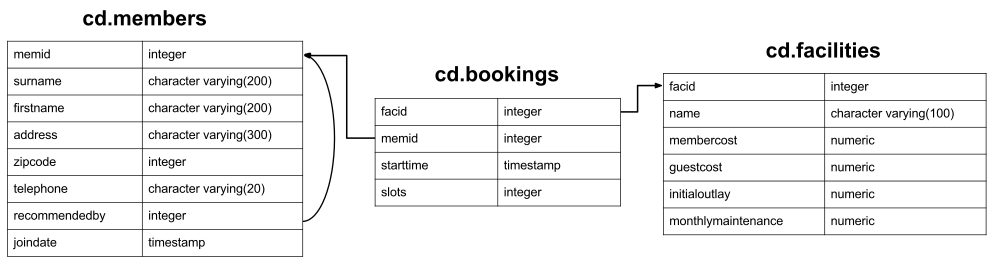
Expected Results
| count | firstname | surname |
|---|---|---|
| 31 | GUEST | GUEST |
| 31 | Darren | Smith |
| 31 | Tracy | Smith |
| 31 | Tim | Rownam |
| 31 | Janice | Joplette |
| 31 | Gerald | Butters |
| 31 | Burton | Tracy |
| 31 | Nancy | Dare |
| 31 | Tim | Boothe |
| 31 | Ponder | Stibbons |
| 31 | Charles | Owen |
| 31 | David | Jones |
| 31 | Anne | Baker |
| 31 | Jemima | Farrell |
| 31 | Jack | Smith |
| 31 | Florence | Bader |
| 31 | Timothy | Baker |
| 31 | David | Pinker |
| 31 | Matthew | Genting |
| 31 | Anna | Mackenzie |
| 31 | Joan | Coplin |
| 31 | Ramnaresh | Sarwin |
| 31 | Douglas | Jones |
| 31 | Henrietta | Rumney |
| 31 | David | Farrell |
| 31 | Henry | Worthington-Smyth |
| 31 | Millicent | Purview |
| 31 | Hyacinth | Tupperware |
| 31 | John | Hunt |
| 31 | Erica | Crumpet |
| 31 | Darren | Smith |
Your Answer
Your Results
Loading database...
Answers and Discussion
select count(*) over(), firstname, surname
	from cd.members
order by joindate
Using the knowledge we've built up so far, the most obvious answer to this is below. We use a subquery because otherwise SQL will require us to group by firstname and surname, producing a different result to what we're looking for.
select (select count(*) from cd.members) as count, firstname, surname
	from cd.members
order by joindate
There's nothing at all wrong with this answer, but we've chosen a different approach to introduce a new concept called window functions. Window functions provide enormously powerful capabilities, in a form often more convenient than the standard aggregation functions. While this exercise is only a toy, we'll be working on more complicated examples in the near future.
Window functions operate on the result set of your (sub-)query, after the WHERE clause and all standard aggregation. They operate on a window of data. By default this is unrestricted: the entire result set, but it can be restricted to provide more useful results. For example, suppose instead of wanting the count of all members, we want the count of all members who joined in the same month as that member:
select count(*) over(partition by date_trunc('month',joindate)),
	firstname, surname
	from cd.members
order by joindate
In this example, we partition the data by month. For each row the window function operates over, the window is any rows that have a joindate in the same month. The window function thus produces a count of the number of members who joined in that month.
You can go further. Imagine if, instead of the total number of members who joined that month, you want to know what number joinee they were that month. You can do this by adding in an ORDER BY to the window function:
select count(*) over(partition by date_trunc('month',joindate) order by joindate),
	firstname, surname
	from cd.members
order by joindate
The ORDER BY changes the window again. Instead of the window for each row being the entire partition, the window goes from the start of the partition to the current row, and not beyond. Thus, for the first member who joins in a given month, the count is 1. For the second, the count is 2, and so on.
One final thing that's worth mentioning about window functions: you can have multiple unrelated ones in the same query. Try out the query below for an example - you'll see the numbers for the members going in opposite directions! This flexibility can lead to more concise, readable, and maintainable queries.
select count(*) over(partition by date_trunc('month',joindate) order by joindate asc),
	count(*) over(partition by date_trunc('month',joindate) order by joindate desc),
	firstname, surname
	from cd.members
order by joindate
Window functions are extraordinarily powerful, and they will change the way you write and think about SQL. Make good use of them!